POS System
Restaurant POS
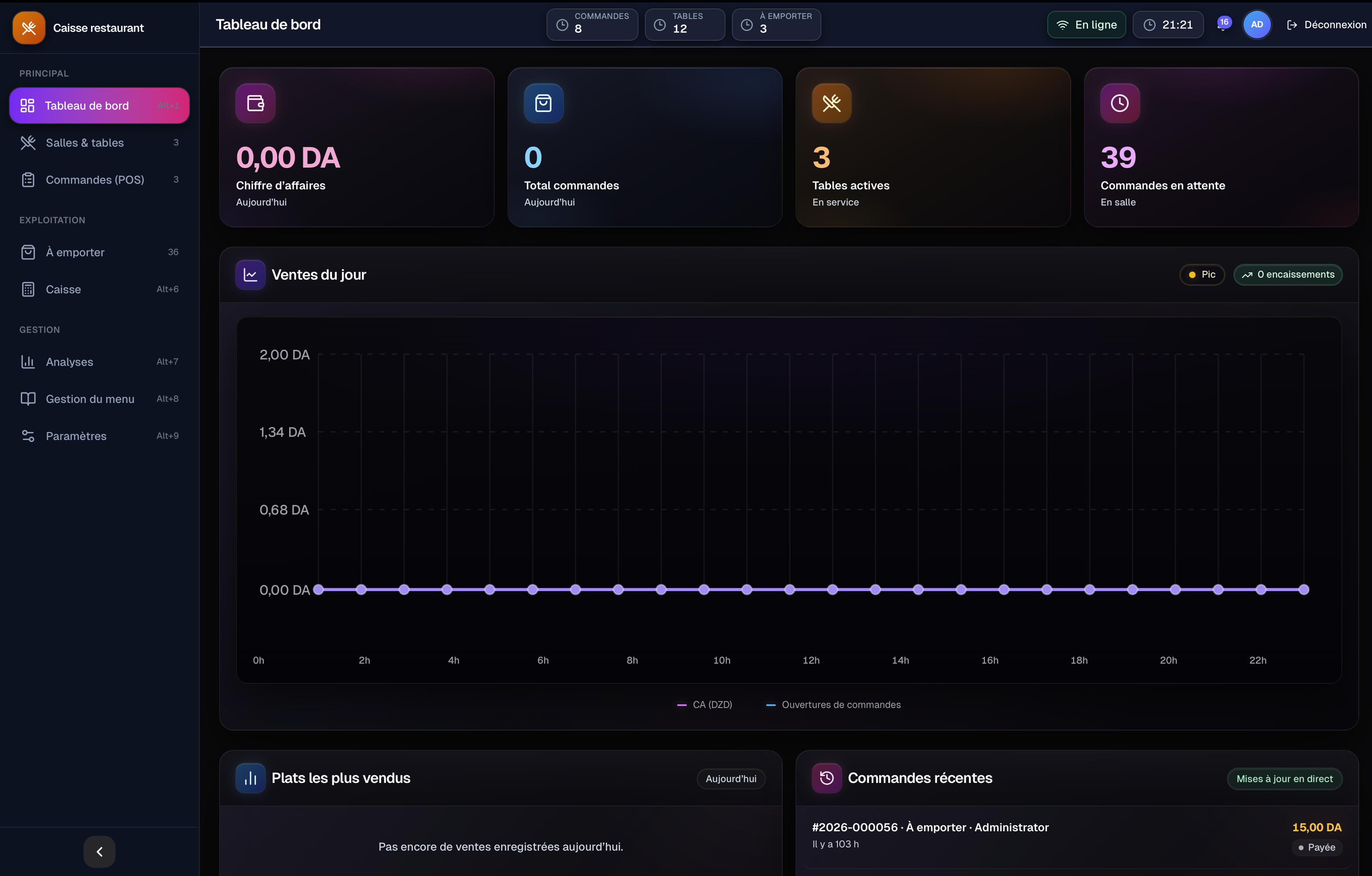
Restaurant POS is a complete cloud-based Point of Sale system designed for restaurants, cafés, and fast-food businesses. It streamlines table management, order processing, cashier operations, takeaway services, menu administration, and real-time business analytics through a modern, responsive dashboard built for high-speed restaurant environments.
Project Overview
Restaurant POS
Cloud-Based Restaurant Management & Point of Sale System
Restaurant POS was designed to replace traditional restaurant management methods with a unified digital platform capable of handling every stage of daily operations, from opening the restaurant to closing the cashier shift. Rather than functioning as a simple ordering application, the system acts as the operational center of the restaurant, allowing managers, cashiers, and waiters to work simultaneously in real time while keeping all restaurant data synchronized.
The project began by analyzing the workflow inside restaurants to understand where staff members lose time during busy service hours. Most existing solutions require switching between multiple screens to manage tables, register payments, monitor takeaway orders, and review sales reports. The goal of this project was to eliminate unnecessary complexity by centralizing every operational task into a single intuitive interface that remains responsive even during peak business hours.
One of the biggest design challenges was organizing a large number of management tools without overwhelming the user. Restaurant employees often have only a few seconds to complete an action while serving customers, making speed more important than visual complexity. To solve this problem, the interface was structured around clear navigation, keyboard shortcuts, large interactive components, and carefully prioritized information. Frequently used actions such as creating orders, opening tables, closing payments, or searching invoices remain accessible within one or two clicks, reducing cognitive load and improving operational efficiency.
The restaurant floor management system was designed to provide a real-time overview of every table inside the restaurant. Staff members can instantly identify whether a table is available, occupied, or reserved while viewing active orders, customer count, order duration, and current bill totals without opening additional windows. Selecting a table immediately displays detailed order information, allowing waiters to add new dishes, resend items to the kitchen, or finalize payments without interrupting service.
Managing takeaway orders introduced another usability challenge. During busy periods, restaurants must simultaneously prepare new orders, monitor cooking progress, handle customer pickups, and record completed deliveries. To simplify this workflow, the system organizes takeaway orders into visual production stages including waiting, preparing, ready for pickup, and completed. Each order automatically updates its status in real time, while delay indicators help employees identify overdue orders before they affect customer satisfaction.
The cashier module was designed to provide complete control over financial operations throughout each working shift. Cashiers can open and close shifts, monitor cash drawer balances, record expenses, process refunds, print receipts, and review transaction history from a single workspace. Instead of navigating multiple accounting screens, financial information is presented through concise operational cards that highlight revenue, expenses, theoretical cash balance, and net income, allowing managers to monitor restaurant performance instantly.
Business intelligence became another essential part of the project. Restaurant managers require more than sales numbers; they need meaningful insights that support better decision-making. For this reason, a dedicated analytics dashboard was designed to visualize revenue trends, order volume, average ticket size, peak operating hours, product performance, and sales distribution across categories. Interactive charts and live indicators transform operational data into actionable information, helping restaurant owners optimize staffing, inventory, and menu strategy.
Designing for dark environments was another important consideration. Restaurant staff often work under varying lighting conditions, making bright interfaces uncomfortable during long operating hours. A carefully balanced dark theme with high contrast typography and vibrant accent colors improves readability while reducing eye fatigue. Color was intentionally reserved for communicating operational status such as active orders, completed payments, warnings, or important notifications, allowing employees to identify critical information immediately without reading extensive text.
Building a real-time system introduced several technical challenges beyond interface design. Multiple employees may edit the same order simultaneously while managers monitor analytics and kitchen staff receive live updates. The system architecture was therefore planned around synchronized data communication, ensuring that every action is reflected instantly across connected devices without requiring manual page refreshes. This approach maintains consistency throughout the restaurant while reducing operational errors caused by outdated information.
The project was designed as a scalable full-stack application capable of supporting restaurants ranging from small cafés to multi-location businesses. The frontend architecture is suitable for implementation using React, TypeScript, Next.js, and Tailwind CSS, providing a responsive interface optimized for desktop touchscreens and tablets. The backend was planned using Node.js, Express.js, PostgreSQL, and Prisma ORM, while Socket.IO enables real-time synchronization between workstations. Authentication is secured through JWT, with role-based permissions controlling access for administrators, managers, cashiers, waiters, and kitchen staff.
Throughout development, several usability issues required multiple iterations before reaching the final design. Early prototypes contained too many controls within individual screens, slowing employee interactions during busy periods. By simplifying layouts, grouping related actions, introducing reusable interface components, and minimizing unnecessary visual elements, the workflow became significantly faster and easier to learn. Keyboard navigation, instant search, and responsive interface behavior further reduced the time required to complete routine restaurant operations.
The final result is a professional restaurant management ecosystem that combines point-of-sale operations, cashier management, table administration, takeaway processing, analytics, and employee workflows into a single integrated platform. Rather than solving one isolated problem, Restaurant POS provides restaurants with a centralized operational system that improves service speed, reduces human error, enhances financial visibility, and creates a more efficient experience for both employees and customers.
Developing this project strengthened my expertise in designing complex business management software where performance, clarity, and real-time collaboration are equally important. It demonstrated how thoughtful UX architecture can simplify operational complexity while delivering a scalable solution capable of supporting restaurants as they continue to grow.
Technologies
Design
Figma
Auto Layout
Components & Variants
Design System
Interactive Prototyping
Frontend
React
Next.js
TypeScript
Tailwind CSS
Backend
Node.js
Express.js
Database
PostgreSQL
Prisma ORM
Real-Time Communication
Socket.IO
WebSockets
Authentication & Security
JWT Authentication
Role-Based Access Control
Secure Session Management
Core Features
Restaurant Dashboard
Table Management
Live Floor Plan
Point of Sale (POS)
Order Management
Kitchen Workflow
Takeaway Management
Cashier & Shift Management
Receipt Printing
Sales Analytics
Financial Reports
Employee Management
Menu Management
Real-Time Notifications
Live Order Synchronization
Multi-user System
* Multi-Restaurant Support
Responsive Design
Dark Mode Interface
Keyboard Shortcuts
Admin Dashboard
Project Information
- Category
- POS System
- Last updated
- August 18, 2026